
Have you ever done a command-line search and replace, but wanted a diff of the changes too?
Replace
Some context first
A long time ago, someone made a Python-based command-line program to do
searching and replacing of text within files and for the longest time, my
problems were solved. Prior to this it was either editing the files by hand,
which can be a fun learning experience, or via Perl's in-place editing
option. The python command is called rpl and handled this specific task really
well. Here's the rpl project page used by the debian distribution.
Over time though, things got a little weird when python 3.0 was released. As the linux distributions tip-toed into the migration, there were oodles of libraries and such that needed to be refactored or even rewritten for the new python release. Lots of things began to break in weird ways for me and so I was forced to either edit the code myself with temporary fixes just so I can keep doing the things I really needed to be doing, or find other things to meet the needs of my "right now".
Side Note: This post is not actually about python at all, nor is this post
complaining about the py3 stuff. That's just the background behind how something
new was given space to percolate given the spontaneous vacuum that manifested
out of my control. The rpl program is likely working well again and if it's
working for you, there is no reason to not use it. To all the contributors to
the python rpl (and all the forks), I'd like to say a very warm thank you, so,
I thank you for your wonderful work.
The main problems I've encountered with the rpl command were unicode-related
library things, and in particular was that the command couldn't even start up to
do it's task because the unicode-thingies just didn't line up and exceptions
were raised. Given the lack of time I had to dedicate to fixing the oddities,
(which I had done a few times already with each distribution package upgrade
forcing me to re-do or otherwise maintain patches), I ended back at my old
friend perl with their intersing -pi -e construct.
Fast forward many years...
... to the creation of Go-Curses. Go-Curses in case you didn't know is a proof-of-concept implementing a GTK-like API for text-based user interface environments, written in Go. There are two main Go packages: the Curses Development Kit (CDK) and the Curses Tool Kit (CTK).
Having written Go-Curses to solve my text-based user interface needs, I needed some small projects to work on that would be addressing real-world issues in my work life to both resolve the necessities and push the boundaries of what Go-Curses can do in these early stages of it's development.
All of the prior posts on this blog, tagged with go-curses, are actually talking about the various programs created as proofs that CTK can actually help my development experience flow better into getting the next things done.
On Tuesday, February 28th 2022, I made the first initial commit of a new rpl
command written using CTK. Now, you might imagine, why on earth would one need
a curses user interface for command-line search and replacement of text? Well,
this is where my requirements for a command-line search and replace experience
diverge from the normal featureset. Given that I was taking the time to actually
implement a formal solution to my needs, I could afford to work out all the
bells and whistles I've ever daydreamed of. Let's take a look at the rough list
of features that formed the specifications and requirements (Specs'n'Reqs for
those that have worked with me before) for this reincarnation of my beloved
rpl command-line experience.
Specifications and Requirements
-
the command must be named
rpland the project namedreplace
This is of course becauserplis just badass and is a part of my muscle memory. -
the usage must be comparable in usage to the python version
-
rpl [options] <search> <replace> <paths...> - option flag may diverge
-
-
the command must support two modes of regular expression handling
-
inspired by perl's
m,s,iandgregex modifiers - one mode is the pattern applied on a per-line basis (default)
- the other mode is the pattern is applied once, globally, allowing for multi-line pattern matching
-
inspired by perl's
-
there must be compact short-form arguments supported
-
instead of
-a -b -c, one could also use-abc -
pick characters that allow spelling geeky things, like my favourite:
-nerd -
don't pick characters that don't actually make sense though, lovely
-nerdmust be a side-effect rather than a forced case (don't brute force life when playing with it is so much more fun!)
-
instead of
-
there must be a
--nopeoption which communicates what would have been done-
it must be called
--nopeand/or--nop
-
it must be called
-
there must be a
--show-diffoption which prints out a unified diff of the changes made or to be made in the case of--nope -
there must be an interactive user interface mode
- walkthrough one file at a time
- each file's changes can be accepted as-is or edited if there's more than one change being made
- when editing the changes for any given file, blocks of changes can be kept or skipped
- all file changesets are presented in unified diff format
-
nice to haves:
- maybe preserve CamelCase and kebab-case things somehow
- unit testing for as much of the codebase as makes sense
- uses a library for performing the actual command-line work
- uses a library for the interactive user interface work
Okay, so, those are quite the list of things to implement, and a diff? really? Yup.
Looking at "normal" operations
Let's start with looking at the normal usage of this new rpl command. We're going
to use the project's _testing directory which has a number of weird files for testing
various cases.
> lhal _testing/
total 13M
drwxr-xr-x 3 user user 4.0K Aug 10 17:57 .
drwxr-xr-x 7 user user 4.0K Aug 10 18:16 ..
-rw-r--r-- 1 user user   12 Aug 10 17:57 .hello-world.hidden
-rw-r--r-- 1 user user  313 Aug 10 17:57 files.list
-rw-r--r-- 1 user user  406 Aug 10 17:57 fmt-test.md
-rw-r--r-- 1 user user  494 Aug 10 17:57 hello.html
-rw-r--r-- 1 user user 2.7M Aug 10 17:57 largefile.txt.gz
-rw-r--r-- 1 user user 3.8M Aug 10 17:57 limitfile.txt
-rw-r--r-- 1 user user 6.6M Aug 10 17:57 megabit-files.tar.gz
-rw-r--r-- 1 user user  105 Aug 10 17:57 strcases.txt
drwxr-xr-x 2 user user 4.0K Aug 10 17:57 subdir
-rw-r--r-- 1 user user  120 Aug 10 17:57 test.txt
-rw-r--r-- 1 user user  120 Aug 10 17:57 test.txt.1.bak
-rw-r--r-- 1 user user  120 Aug 10 17:57 test.txt.bak
-rw-r--r-- 1 user user  120 Aug 10 17:57 test.txt~
-rw-r--r-- 1 user user  120 Aug 10 17:57 test.txt~1~
We can see that there's some .gz archives, some of the files are pretty big as
far as text-based things go and so on. Most of these files contain the words
"hello" and "world", in various variations and hyphenations. So, let's play with
that a little in this demonstration.
Let's replace "hello" with "hi" (case-sensitively) and use git diff to see the
changes:
> rpl hello hi _testing/*
# made 2 changes to: "_testing/files.list"
# made 3 changes to: "_testing/strcases.txt"
diff --git a/_testing/files.list b/_testing/files.list
index 370e090..5dd182f 100644
--- a/_testing/files.list
+++ b/_testing/files.list
@@ -1,11 +1,11 @@
 _testing/test.txt~
 _testing/subdir/moar.txt
-_testing/.hello-world.hidden
+_testing/.hi-world.hidden
 _testing/largefile.txt
 _testing/test.txt
 _testing/test.txt.1.bak
 _testing/files.list
-_testing/hello.html
+_testing/hi.html
 _testing/test.txt.bak
 _testing/fmt-test.md
 _testing/largefile.txt.gz
diff --git a/_testing/strcases.txt b/_testing/strcases.txt
index 13a41bc..e5d0707 100644
--- a/_testing/strcases.txt
+++ b/_testing/strcases.txt
@@ -1,4 +1,4 @@
 HelloWorld is CamelCase
-helloWorld is lowerCamelCase
-hello-world is kebab-case
-hello_world is snake_case
+hiWorld is lowerCamelCase
+hi-world is kebab-case
+hi_world is snake_case
Okay, so that did what we needed it to do. Let's take a look at the built-in documentation, how helpful is it?
Getting some help...
rpl actually supports a shorter and a longer presentation of the help text.
The following is the "brief" text, which is accessed via the -h argument.
> rpl -h
NAME:
   rpl - text search and replace utility

USAGE:
   rpl [options] <search> <replace> [path...]

VERSION:
   0.10.0 (trunk)

GLOBAL OPTIONS:
   1. Case Sensitivity

   --ignore-case, -i    perform a case-insensitive search (plain or regex)
   --preserve-case, -P  try to preserve replacement string cases

   2. Regular Expressions

   --dot-match-nl, -s  set the dot-match-nl (?s) global flag (implies -r)
   --multi-line, -m    set the multiline (?m) global flag (implies -r)
   --regex, -r         search and replace arguments are regular expressions

   3. User Interface

   --interactive, -e  selectively apply changes per-file
   --pause, -E        pause on file search results screen (implies -e)
   --show-diff, -d    output unified diffs for all changes

   4. Backups

   --backup, -b                        make backups before replacing content
   --backup-extension value, -B value  specify the backup file suffix to use (implies -b)

   5. Target Selection

   --all, -a                  include backups and files that start with a dot
   --exclude value, -X value  exclude files matching glob pattern
   --file value, -f value     read paths listed in files
   --include value, -I value  include on files matching glob pattern
   --null, -0                 read null-terminated paths from os.Stdin
   --recurse, -R              travel directory paths

   6. General

   --help             display complete command-line help text
   --nope, --nop, -n  report what would otherwise have been done
   --quiet, -q        silence notices
   --usage, -h        display command-line usage information
   --verbose, -v      verbose notices
   --version, -V      display the version
Wow, that's not really "brief" is it! Well, as with all things, context is important so let's take a look at the "not brief" documentation.
> rpl --help
NAME:
   rpl - text search and replace utility

USAGE:
   rpl [options] <search> <replace> [path...]

VERSION:
   0.10.0 (trunk)

DESCRIPTION:

   rpl is a command line utility for searching and replacing content within plain
   text files.

   * rpl supports long-form and short-form command-line flags
   * provides diff and notices on different outputs (os.Stdout and os.Stderr)
   * has a Go-Curses user interface for interactively selecting changes to apply
     (in the spirit of "git add --patch")
   * can preserve the case of the per-instance strings being replaced
   * supports regular expressions applied on a per-line or multi-line basis
   * target files can be provided via os.Stdin, files or command-line arguments


   Case operations:

    # change all instances of "search" exactly with "replace"
    #
    # flags: none (case-sensitive)

    rpl "search" "replace" *

    # change all instances of "search" with "replace"
    #
    # flags: --ignore-case (-i)

    rpl -i "search" "replace" *

    # change all instances of "SearchQuery" with "ReplaceValue", which will
    # ignores case while finding matches, detects the individual replacement
    # cases and maintains that case with the replacement value
    #
    # flags: --preserve-case (-P)

    rpl -P "SearchQuery" "ReplaceValue" *
    #
    # changes "SEARCHQUERY" to "REPLACEVALUE"
    # changes "searchquery" to "replacevalue"
    # changes "SearchQuery" to "ReplaceValue"
    # changes "searchQuery" to "replaceValue"

    # don't actually change all instances of "search" with "replace"
    #
    # flags: --ignore-case (-i), --nop (-n)

    rpl -in "search" "replace" *


   Interactive operations:

    # rpl has a curses based user-interface for interactively applying changes
    # to the matching files and works with all other command-line flags
    #
    # flags: --ignore-case (-i), --interactive (-e)

    rpl -ie "search" "replace" *
    #
    # once all the files have been filtered through any --include or --exclude
    # options, the user-interface walks through each file, prompting the user
    # with a unified diff of the changes to either Skip or Apply to the given
    # file. If there are more than one group of edits within the unified diff,
    # an additional option, Select, is added which allows the user to walk
    # through all the edit groups to pick and choose, similarly to how git
    # works with the "git add --patch ..." operation


   Backup operations:

    # backup and change all instances of "search" with "replace"; backup
    # files are named a trailing "~"; if the filename already exists, backup
    # file names end with a "~", an incremented number, and another "~"
    #
    # flags: --ignore-case (-i), --backup (-b)

    rpl -ib "search" "replace" *
    #
    # first backup filename: example.txt~
    # second backup filename: example.txt~1~

    # backup and change all instances of "search" with "replace"; backup
    # files are named a ".bak" extension; if the filename already exists,
    # backup file names end with a ".", an incremented number, and have a
    # ".bak" extension
    #
    # flags: --ignore-case (-i), --backup-extension (-B)

    rpl -i -B .bak "search" "replace" *
    #
    # first backup filename: example.txt.bak
    # second backup filename: example.txt.1.bak


   Unified diff output:

    # don't actually recursively change "search" to "replaced" and print a
    # universal diff of the changes that would be made to STDOUT, any errors
    # or other notices are printed to STDERR
    #
    # flags: --nop (-n), --recurse (-R), --show-diff (-d)

    rpl -nRd "search" "replaced" .

    # same as above but save the diff output to a file
    #
    # flags: --nop (-n), --recurse (-R), --show-diff (-d)

    rpl -nRd "search" "replaced" . > /tmp/search-replaced.patch

    # same as above but interactively, which outputs the user-interface to
    # STDOUT and so the diff is output to STDERR
    #
    # flags: --nop (-n), --interactive (-e), --recurse (-R), --show-diff (-d)

    rpl -neRd "search" "replaced" . 2> /tmp/search-replaced.patch


   Regular Expression operations:

    # rpl supports search and replace operations using the Go language version
    # of regular expressions, see: https://pkg.go.dev/regexp/syntax for the
    # supported syntax and limitations; all search patterns are prefixed with
    # a global (?m) flag because the default mode would be to only search and
    # replace within the first line of a file's content
    #
    # flags: --regex (-r), --ignore-case (-i)

    rpl -ri '([a-z])([-a-z0-9]+?)' '${1}_${2}' *
    #
    # this pattern captures two groups of characters, the first is a single
    # lower-case letter and the second is one or more dashes, lower-case
    # letters or numbers; because the --ignore-case flag is also present,
    # the search pattern is prefixed with a global (?i) flag to match text
    # case- insensitively
    #
    # the replacement pattern simply separates the two groups with an
    # underscore, note that the Perl \1 syntax is not supported and that
    # single-quotes are used to ensure the shell does not interpret the
    # regex variables as shell variables

    # one of the great regex flags is the (?s) option which changes the
    # interpretation of the (any character) ".", caret "^" and other syntax
    # to include newlines. The user can just add a leading (?s) to the search
    # pattern but rpl includes a --dot-match-nl flag which does this and when
    # used, the normal --regex flag is not required
    #
    # flags: --multi-line (m) --dot-match-nl (-s), --ignore-case (-i)

    rpl -msi '^func thing\(\) {\s^(.+?)^}$' 'func renamed() {\n${1}\n}' *.go
    #
    # this pattern captures the multi-line contents of static Go functions
    # named "thing" and simply renames them to "renamed"


   File selection operations:

    # rpl accepts a variable list of path arguments which are individually
    # converted to their absolute path equivalents and tested to see if they
    # even exist at all. Sometimes this method of supplying file names is not
    # good enough, such as when there are more files in the list than the OS
    # allows in a single command. For these sorts of cases, there are a few
    # more ways to supply paths, with all of them working together to build up
    # a list of all the files to work with

    # command line arguments method:
    #
    # flags: (none)

    rpl "search" "replace" ...

    # using newline-separated paths listed within one or more text files:
    #
    # flags: --file (-f)

    rpl -f filenames.txt "search" "replace"

    # using newline-separated paths derived from standard input:
    #
    # flags: (none), with single dash path

    find * -type f | rpl "search" "replace" -

    # using null-separated paths derived from standard input:
    #
    # flags: --null (-0), with single dash path

    find * -type f -print0 | rpl -0 "search" "replace" -

    # excluding globs of files:
    #
    # flags: --exclude (-X)

    rpl -X "*.bak" "search" "replace" *
    #
    # any file with the extension .bak is completely ignored

    # including globs of files:
    #
    # flags: --include (-I)

    rpl -I "*.txt" "search" "replace" *
    #
    # any file without the extension .txt is completely ignored

    # combining --exclude with --include requires the files to satisfy both
    # conditions, they must not be excluded and also must be included too
    #
    # flags: --exclude (-X), --include (-I)

    rpl -X "example.*" -I "*.txt" -I "*.md" "search" "replace" *
    #
    # replaces "search" with "replace" in all files that do not start with the
    # word "example" and also end with .txt or .md extensions

   Limitations:

   * maximum file size: 5.2 MB
   * maximum number of files: 1,000,000
   * more than 10k changes per file can consume gigabytes of memory


GLOBAL OPTIONS:
   1. Case Sensitivity

   --ignore-case, -i    perform a case-insensitive search (plain or regex)
   --preserve-case, -P  try to preserve replacement string cases

   2. Regular Expressions

   --dot-match-nl, -s  set the dot-match-nl (?s) global flag (implies -r)
   --multi-line, -m    set the multiline (?m) global flag (implies -r)
   --regex, -r         search and replace arguments are regular expressions

   3. User Interface

   --interactive, -e  selectively apply changes per-file
   --pause, -E        pause on file search results screen (implies -e)
   --show-diff, -d    output unified diffs for all changes

   4. Backups

   --backup, -b                        make backups before replacing content
   --backup-extension value, -B value  specify the backup file suffix to use (implies -b)

   5. Target Selection

   --all, -a                  include backups and files that start with a dot
   --exclude value, -X value  exclude files matching glob pattern
   --file value, -f value     read paths listed in files
   --include value, -I value  include on files matching glob pattern
   --null, -0                 read null-terminated paths from os.Stdin
   --recurse, -R              travel directory paths

   6. General

   --help             display complete command-line help text
   --no-limits, -U    ignore max file count and size limits
   --nope, --nop, -n  report what would otherwise have been done
   --quiet, -q        silence notices
   --usage, -h        display command-line usage information
   --verbose, -v      verbose notices
   --version, -V      display the version
Okay, okay, so the -h text is in fact brief in comparison to the --help text.
Limitations
Alright, so if you read that text, you now know all sorts of things and ways to
use rpl... and something very important, it's limitations. Let's focus on that
for a moment:
   Limitations:

   * maximum file size: 5.2 MB
   * maximum number of files: 1,000,000
   * more than 10k changes per file can consume gigabytes of memory
Something discovered with the diff libraries used by rpl is that there are
limitations on how big files can be when computing the changesets. Many
gigabytes of memory can get consumed in computing just one patch. I'm no wizard
at these things, and given the lack of public libraries that work with diff
operations, I imagine this process is non-trivial to implement.
So, I just looked up one of the packages used by rpl and discovered that the
github repository has been archived as of February 9th, 2024. Bummer. The
package is gotextdiff. Luckily they archived it without telling us anything
about how to deal with this abandonment, nor even why this was
necessary. Wonderful, much thanks hexops for you consideration and for your
work up until the point of abandoning your work. gotextdiff was/is used
specifically because of it's support for the unified diff output. The other
library, go-diff is used to apply diff changes to files and that one looks
like it's still maintained. Thank you Sergi for your open and valuable
experience!
So, that sort of derailed me in writing this post, but that's okay. We can move
on with a closing summary to this section that the limitations are not just
about the packages used to write rpl but also by the laws of physics and math,
so working with large files or otherwise thousands of changes within any given
file - that's a tough problem to handle. For the adventurous though, if you
noticed in the --help text (not mentioned in the -h output), there is a flag
available: --no-limits which bypasses the regulating bits and allows for
unlimited numbers of file, unlimited changes and unlimited file sizes. Please
use that with care and know that the behaviour of rpl with the --no-limits
flag is considered undefined. Maybe it'll work, maybe it'll eat the
filesystem. No idea because I've never actually needed to use it because of
other command-line things like xargs which can batch calls to rpl and work
around the file count limitation.
Looking at diff outputs
This is a look at why I'm so sad about this gotextdiff situation. What does this diff feature look like in practice?
Well, let's start by resetting the changes in the _testing directory.
> git st
On branch trunk
Your branch is up to date with 'origin/trunk'.

Changes not staged for commit:
  (use "git add <file>..." to update what will be committed)
  (use "git restore <file>..." to discard changes in working directory)
	modified:   _testing/files.list
	modified:   _testing/strcases.txt

no changes added to commit (use "git add" and/or "git commit -a")
> git diff | patch -R -p1
patching file _testing/files.list
patching file _testing/strcases.txt
Okay, with all that cleaned up, here's the previous example of replacing "hello"
with "hi", but using the --nope, --recurse and --show-diff flags.
> rpl -nRd hello hi _testing
# [nop] would have made 2 changes to: "_testing/files.list"
--- a/_testing/files.list
+++ b/_testing/files.list
@@ -1,11 +1,11 @@
 _testing/test.txt~
 _testing/subdir/moar.txt
-_testing/.hello-world.hidden
+_testing/.hi-world.hidden
 _testing/largefile.txt
 _testing/test.txt
 _testing/test.txt.1.bak
 _testing/files.list
-_testing/hello.html
+_testing/hi.html
 _testing/test.txt.bak
 _testing/fmt-test.md
 _testing/largefile.txt.gz
# [nop] would have made 3 changes to: "_testing/strcases.txt"
--- a/_testing/strcases.txt
+++ b/_testing/strcases.txt
@@ -1,4 +1,4 @@
 HelloWorld is CamelCase
-helloWorld is lowerCamelCase
-hello-world is kebab-case
-hello_world is snake_case
+hiWorld is lowerCamelCase
+hi-world is kebab-case
+hi_world is snake_case
# [nop] would have made 1 changes to: "_testing/subdir/moar.txt"
--- a/_testing/subdir/moar.txt
+++ b/_testing/subdir/moar.txt
@@ -1,2 +1,2 @@
 moar testing
-hello strange new worlds
+hi strange new worlds
So, a lot is going there, let's unpack it a little.
All of the lines in the above starting with a # character are the notices
printed by rpl to let you know something. The messages on these lines are also
prefixed with a [nop] indicating that no operation was performed. Now one
might think that these notices would interfere with the diff output, however
this is not the case because these lines are printed to standard error while the
diff itself is printed to standard out. So, let's do that example again, this
time redirecting the diff output to a temporary file (note that we don't need to
reset the _testing directory because no changes were actually made due to
--nope).
> rpl -nRd hello hi _testing > /tmp/hi.patch
# [nop] would have made 2 changes to: "_testing/files.list"
# [nop] would have made 3 changes to: "_testing/strcases.txt"
# [nop] would have made 1 changes to: "_testing/subdir/moar.txt"
Neat! Okay, so we can inspect the diff output to make sure that the changes are
in fact what we want to have happen and then we can actually apply the diff itself
using the patch command-line program, or even just re-run the original rpl command
and pipe the output into a patch -p1 invocation.
> rpl -nRd hello hi _testing/ | patch -p1
# [nop] would have made 2 changes to: "_testing/files.list"
# [nop] would have made 3 changes to: "_testing/strcases.txt"
# [nop] would have made 1 changes to: "_testing/subdir/moar.txt"
patching file _testing/files.list
patching file _testing/strcases.txt
patching file _testing/subdir/moar.txt
Okay, that [nop] output is sort-of strange in this context, so when I find my
self doing these sorts of piped operations, I tend to include a little --quiet
in my life. Let's see what that looks like after resetting the _testing
directory.
> rpl -qnRd hello hi _testing/ | patch -p1
patching file _testing/files.list
patching file _testing/strcases.txt
patching file _testing/subdir/moar.txt
Neat and tidy! This diff stuff is pretty slick and easy to get comfortable with so obviously I'm going to need to sort out a better unified diff library to use as a replacement for gotextdiff. At least they didn't [left pad] the entire repository.
Deeper into this unified diff experience...
So, I love diff and patch, obviously, and we've seen what that looks like
in practice in non-interactive cases, but what about cases where not every
replacement in a file is wanted?
Instead of replacing case-sensitively, let's --ignore-case and --interactive
to walk through and selectively apply changes.... and still --show-diff too.
We'll do this with just two files because, well, that's a lot of screenshots to
make! Woo! Screenshots!
Just for reference purposes, here's the non-interactive version of the command we're going to use:
> rpl -qind hello hi _testing/hello.html _testing/test.txt
--- a/_testing/hello.html
+++ b/_testing/hello.html
@@ -5,15 +5,15 @@
     </head>
     <body>
         <header>
-            <h1>Hello World</h1>
+            <h1>hi World</h1>
         </header>
         <main>
-            <p>The usage of the words "Hello World", in this document
+            <p>The usage of the words "hi World", in this document
             are for the purpose of testing groups of World changes
-            within the same file. Hello World.</p>
+            within the same file. hi World.</p>
         </main>
         <footer>
-            <p>Hello World appears here again</p>
+            <p>hi World appears here again</p>
         </footer>
     </body>
 </html>
--- a/_testing/test.txt
+++ b/_testing/test.txt
@@ -1,4 +1,4 @@
-Hello World
+hi World

 This is a test text file. Sometimes the test edits are on the same line.
We can see that the hello.html file has multiple replacements while the
test.txt file has only one.
Here's the interactive version of the command and a screenshot of the user interface:
> rpl -qined hello hi _testing/hello.html _testing/test.txt
First interactive view...
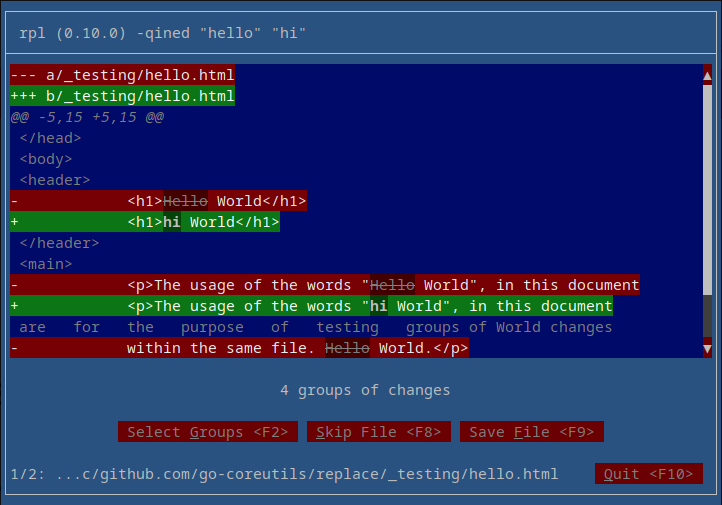
Neat! I like it! We can see all sorts of important information, such as...
- command arguments at the top (along with the version number)
-
colourized diff output for the
hello.htmlfile - a note that there are a total of four groups of changes we can work with
-
some action buttons for operating on
hello.html - a footer note that this is the first of two files
-
a (truncated) full path to the
hello.htmlfile - and finally a button to end the interactive session immediately
As we're demonstrating things, instead of pressing Skip File or Save File,
let's pick Select Groups and take just the first and last ones presented.
Selecting groups
There are a number of ways to interact with the user interface in order to start the group selection process:
-
pressing
<F2> -
using the
<Tab>key to highlight theSelect Groupsbutton and then pressing<Enter>or<Space> - or if the terminal supports a hardware mouse, clicking on the button itself
As I'm a fan of keyboard navigation, and I like minimizing keystrokes, I'm
pressing <F2>...
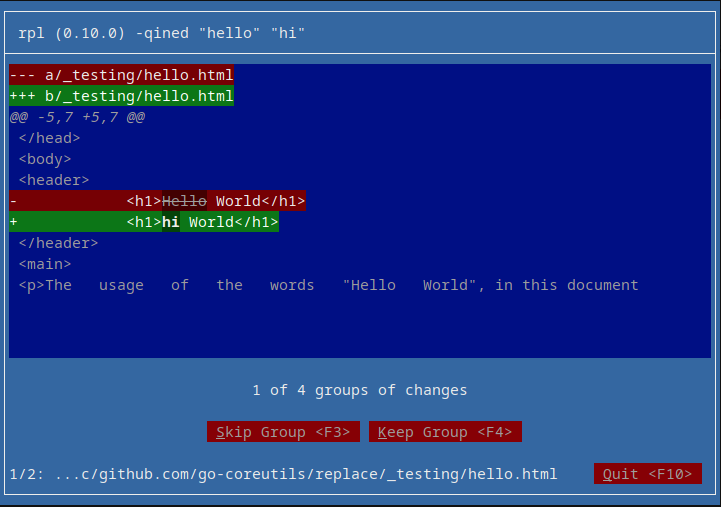
Here we're presented with another unified diff, but this time, there is just one
change group presented. As we want to keep the first and last ones, let's press
<F4> to keep this group.
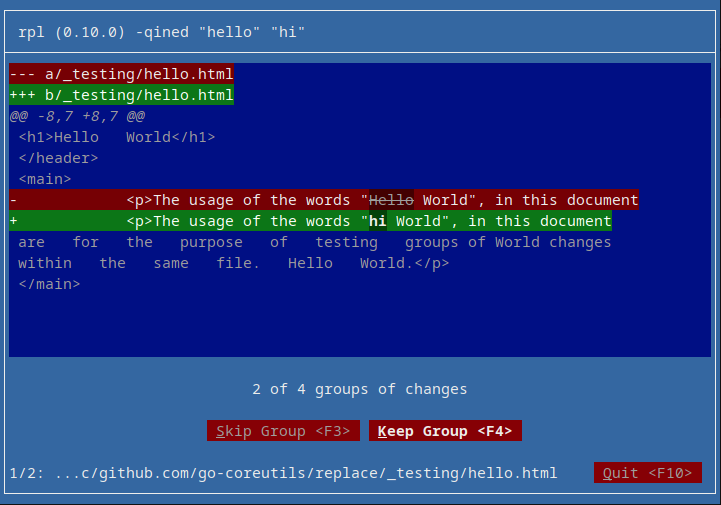
Having pressed <F4> to keep the first group, we're presented with the second
of the four groups and we'll note that the Keep Group button is in fact still
selected, showing that the user-interface isn't just redrawing the whole thing
every time.
Let's keep moving forward and skip this and the next group by pressing <F3>...
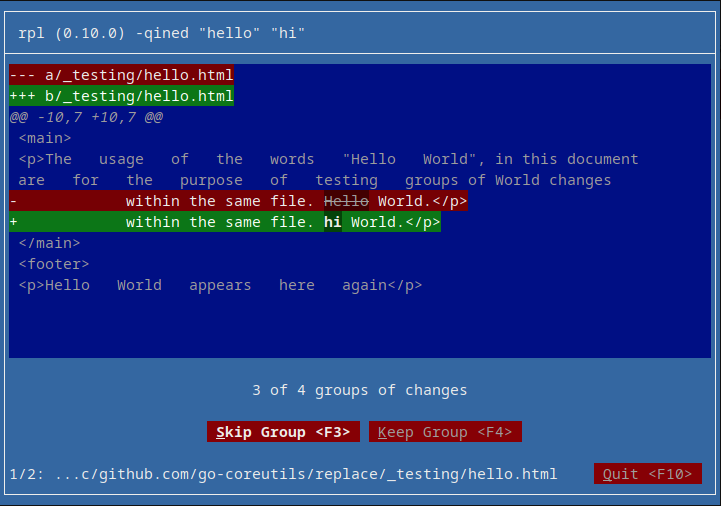
... and pressing <F3> one more time...
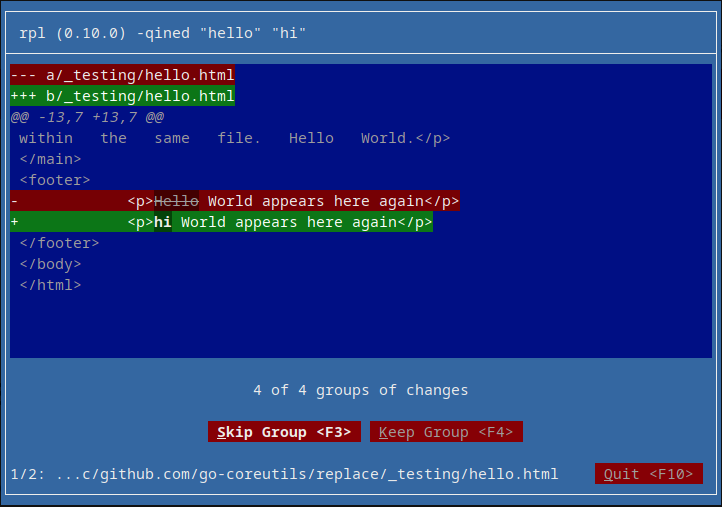
Alright! As we want to keep this last change, let's press <F4>.
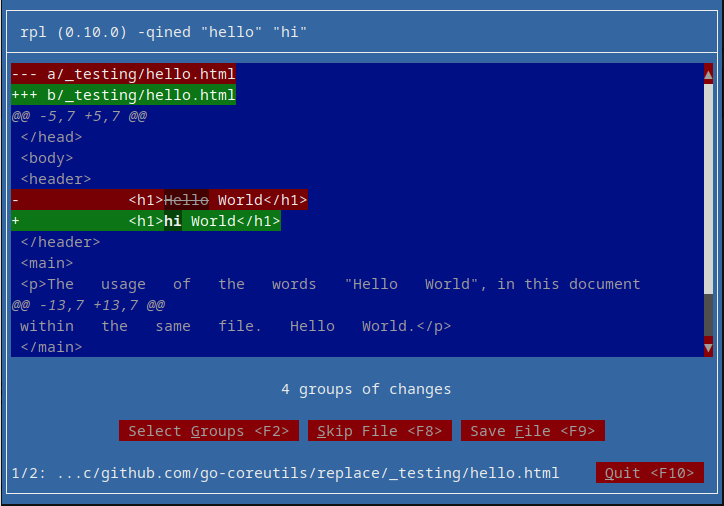
Oopsie! There's a bug! Do you see it? The UI is telling us there's four groups of
changes even though we've only selected two. It should probably say something like
2 of 4 groups of changes. I'll have to fix that when I get around to solving the
gotextdiff issue.
Okay, at this point, let's press <F9> to Save File. There is something important
to remember though, we invoked this session with the --nope flag present, so what
is saving this going to do? No worries, we'll find out when we're done!
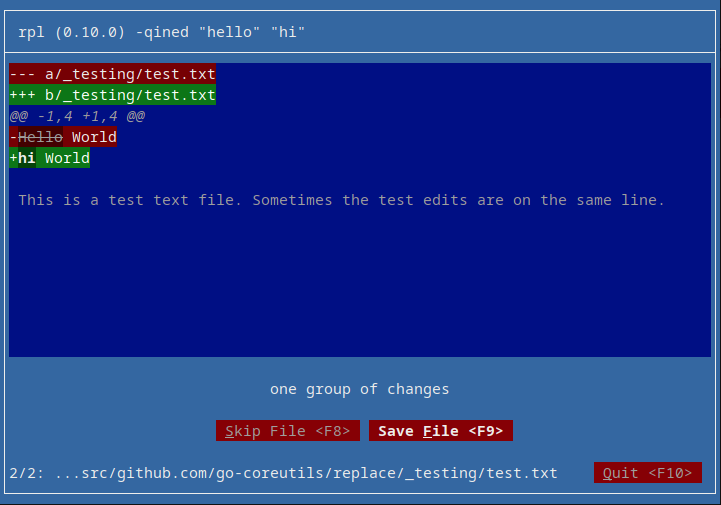
Neat! It took us right to the second of two files, as noted in the footer line,
and we can see that there's only one group of changes, thus naturally there's no
Select Groups button present.
Because we're just demonstrating, and having looked at the changes for the
test.txt file, we've just decided we don't want to make this particular
replacement so let's press <F8> and Skip File.
rpl quit and without sharing the diff output
Oopsie again! We found a second bug (though these bugs are known to me, these are
the only two bugs I've been neglecting up until this posting). The second bug is
that when --quiet and --interactive, --show-diff does nothing. This bug likely
has to do with how the diff output is accumulated during the interactive process
and due to being --quiet, it's not outputting the diff when it should, which is
at the end and because it's --interactive, the diff should be printed to standard
error so that users can redirect or otherwise interact with the output.
Let's try that all over again, this time without --quiet.
> rpl -ined hello hi _testing/hello.html _testing/test.txt
 (... <F2> <F4> <F3> <F3> <F4> <F9> <F8> ...)
--- a/_testing/hello.html
+++ b/_testing/hello.html
@@ -5,7 +5,7 @@
     </head>
     <body>
         <header>
-            <h1>Hello World</h1>
+            <h1>hi World</h1>
         </header>
         <main>
             <p>The usage of the words "Hello World", in this document
@@ -13,7 +13,7 @@
             within the same file. Hello World.</p>
         </main>
         <footer>
-            <p>Hello World appears here again</p>
+            <p>hi World appears here again</p>
         </footer>
     </body>
 </html>
Groovy, okay so that's working. We could of course, because the diff is output to standard error, redirect standard error to a file without impairing standard input which is where the text-based user interface lives.
> rpl -ined hello hi _testing/hello.html _testing/test.txt 2> /tmp/hi.patch
 (... <F2> <F4> <F3> <F3> <F4> <F9> <F8> ...)
> cat /tmp/hi.patch
--- a/_testing/hello.html
+++ b/_testing/hello.html
@@ -5,7 +5,7 @@
     </head>
     <body>
         <header>
-            <h1>Hello World</h1>
+            <h1>hi World</h1>
         </header>
         <main>
             <p>The usage of the words "Hello World", in this document
@@ -13,7 +13,7 @@
             within the same file. Hello World.</p>
         </main>
         <footer>
-            <p>Hello World appears here again</p>
+            <p>hi World appears here again</p>
         </footer>
     </body>
 </html>
Conclusion
So, while there is always one more bug, feature, or otherwise interesting idea to develop further, it's not that bad so far and is working well enough that I'm comfortable talking about this publicly.
Enjoy!